
 |
 |
 |
| Home | About | Contact |
Works Database Converter
Got an old Microsoft Works Database file that you can no longer read?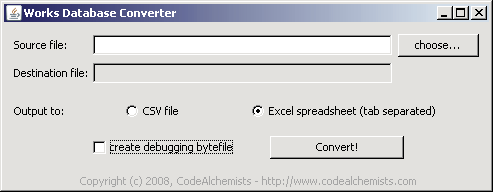
Example screenshot
This application converts old Microsoft Works Database (*.wdb) files (e.g. MS Works 3 and 4) into a spreadsheet compatible with all versions of Microsoft Excel. The data extraction is done on a 'best-effort' basis, which works reasonably well provided that you only have one table of data per file that you process.
The best solution is always to load up the database into an old copy of Microsoft Works and then export as CSV, or some other file format readable by Excel or Access. However, in the event that you only have the database file, this application may help.
Requirement: You need Java installed on your computer for this application to work. You can check whether you already have Java via this page.
Donation-ware
Works Database Converter is free, but supported entirely by donations. If you find it useful please consider making a donation below (even a few €/$/£ help to keep this website running).
(paypal account not required)
Launch the application using Java Webstart
Note: You may need to accept a security warning. This is normal because this application needs access to your computer in order to read your files for conversion. Your data remains safe and secure on your computer. At no point is your data ever sent across the internet.
- Click on the icon to launch Works Database Converter now.
Note: You may need to accept a security warning. This is normal because this application needs access to your computer in order to read your files for conversion. Your data remains safe and secure on your computer. At no point is your data ever sent across the internet.
Application Blocked by Java Security?
Recently, several people have found that Windows now always blocks Java applications, with no obvious way of
allowing them to run:
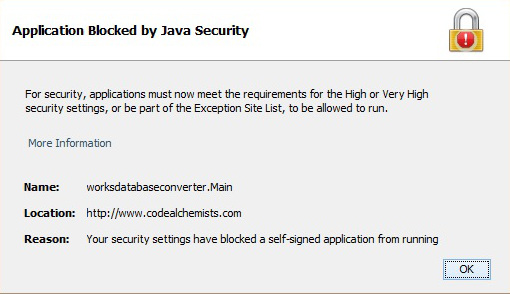
Solution
You have two options - either change the security level for Java applications, or if you prefer not to do this, download Works Database Converter and run it directly on your system - see "Run Works Database Converter from the Command Line", below.
Change security level
Solution
You have two options - either change the security level for Java applications, or if you prefer not to do this, download Works Database Converter and run it directly on your system - see "Run Works Database Converter from the Command Line", below.
Change security level
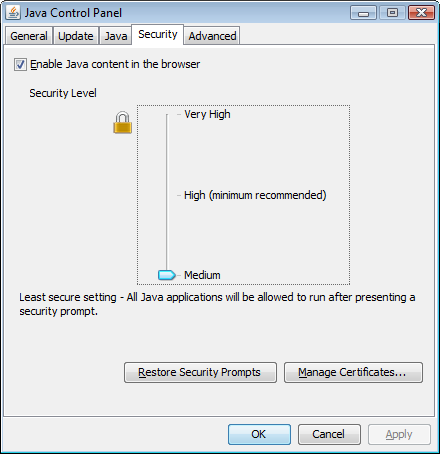
- Go to the Java Control Panel (On Windows Click Start and then Configure Java - you can type this into the Search programs and files bar)
- Click on the Security tab
- Ensure Enable Java content in the browser is ticked
- Drag the security level down to Medium
- Now try running Works Database Converter again.
- We strongly recommend that you put the security level back to High or Very High when you have finished using Works Database Converter.
Run Works Database Converter from the Command Line
Works Database Converter was last updated on 20th May 2008. This new version improves the handling of numeric
fields.
- Download WorksDatabaseConverter.jar and move it to a local directory
- Open a command prompt / terminal window and 'cd' to that directory
- Run
java -jar WorksDatabaseConverter.jar <your-database-filename>
If you should find a bug with this application, please report it at bugs.codealchemists.com.